Building a Color Picker for the Terminal
Or how I ended drawing the OKLCH gamut with braille dots
Date:- pythontextualtuipixel artcoloroklch
For some time now I have been working on amberglyf, a pixel art editor that lives entirely inside the terminal, written in Python. The closest thing that already exists is cmdpxl, and I studied it a lot as a reference, but my goal is more ambitious: I want a complete pixel art editor in the terminal. That means frames, an animation timeline, GIF import and export, spritesheet slicing... a lot more features than a simple canvas with a pencil. And one of those features, the one this post is about, is a proper palette system.
Why palette-first? Because that is how real pixel art works. PICO-8 gives you 16 colors, most Lospec palettes are between 8 and 32. The fast workflow is to define your colors once and then draw with the number keys. But if the palette is the heart of the workflow, then the palette editor needs a good color picker, and the terminal does not exactly come with one built in. So I had to build it.
The widget contract
The first decision was that the picker should know nothing about the rest of
the application. You drop it into a layout, route your keys to four public
methods, and listen for a Changed message when the color moves.
That's it, that's the whole contract.
python
class Picker(Widget):
"""Color picker, ready to drop into a host layout.
Host wires keys to: `cycle_focus()`, `next_mode()`, `prev_mode()`,
`adjust(dx, dy, coarse)`. Listen for `Picker.Changed` to react to edits.
"""This sounds like an obvious thing to do, and it is, but it forced me to be honest about the boundaries. The picker doesn't read the keyboard, and knows nothing about the canvas or the palette. It also meant I could run it standalone with a tiny harness while developing11.
Four ways to think about color
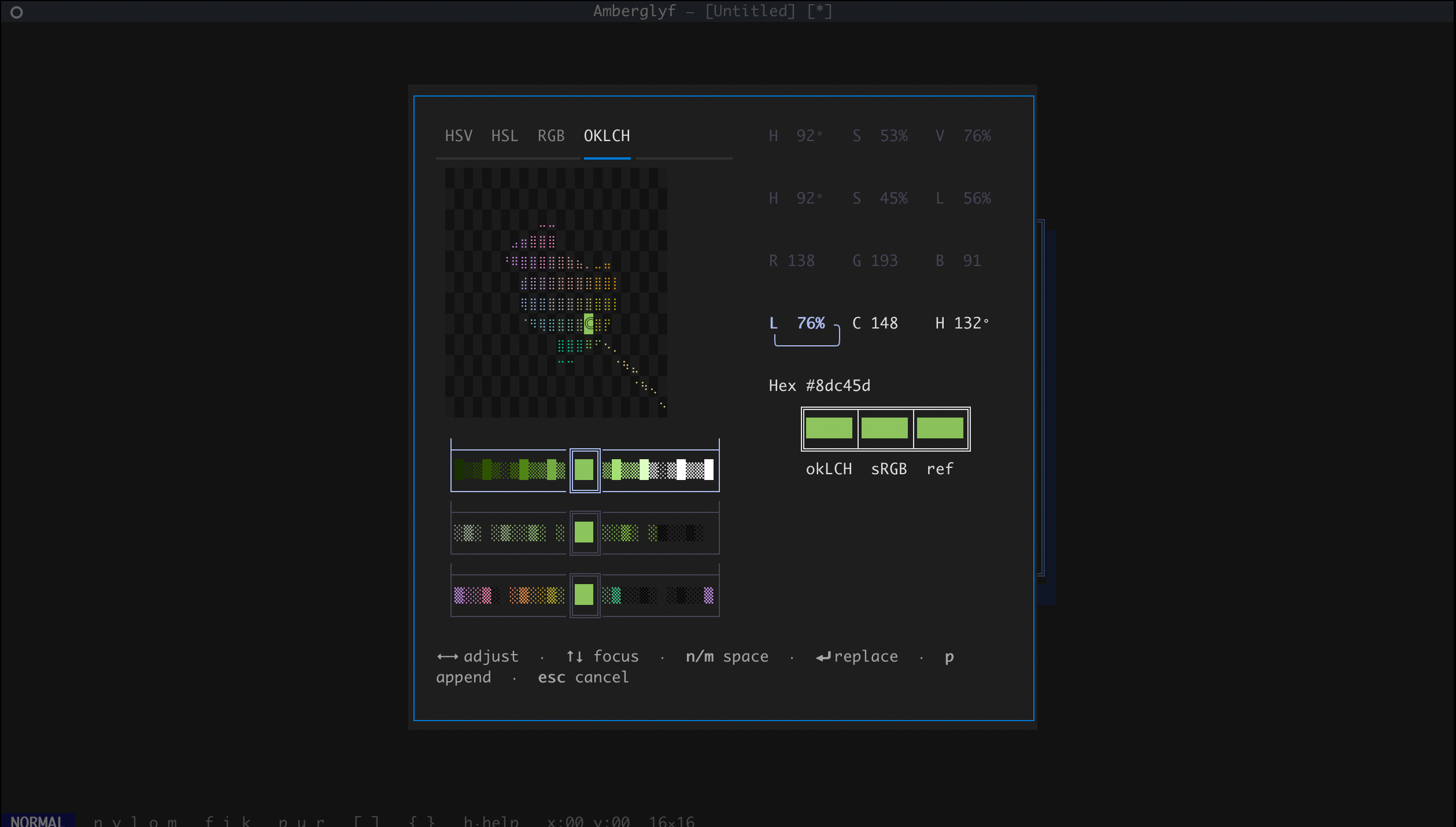
I didn't want to force a single mental model of color on anyone, so the picker has four modes: HSV and HSL (a 2D map with a braille crosshair plus a hue thumbwheel), RGB (three stacked thumbwheels), and OKLCH, which gets its own sections below because it was by far the most complex part of the whole thing.
The first three modes share one canonical state: HSV. RGB and HSL are derived from it, and setting an RGB channel just recomputes the HSV behind the scenes. There was a trap here. When lightness hits 0 or 1, the HSL saturation mathematically collapses to zero. So if you dragged the lightness down to black and back up, you landed on a gray instead of your color. The fix was making saturation "sticky": the state remembers what you asked for, and only trusts the derived value when it actually means something.
python
@property
def hsl(self):
s_hsl_derived, l = hsv_to_hsl(self.s, self.v)
s_hsl = self._s_hsl if l in (0.0, 1.0) else s_hsl_derived
return self.hue, s_hsl, lThe pattern is remember the intent, not just the displayable value.
Enter OKLCH
OKLCH is the perceptually uniform color space that CSS adopted a while ago, and I really wanted it in the picker. The promise is lovely: nudge a color by the same numeric step and you get the same perceived change, no matter where you are. Anyone who has fought with HSV knows that a 10° hue rotation near yellow and one near blue are two very different experiences.
The price of that promise is geometry.
In HSV, every combination of values is a color you can display. In OKLCH... no. The sRGB gamut seen from OKLCH is an irregular blob: for a given lightness and hue there is a maximum chroma, and past it the color simply does not exist on your screen. You can ask for it, the math will happily give you coordinates, but there is nothing to paint.
So the picker needs to answer, constantly, "does this color exist?". I went with the lazy but correct approach: convert to sRGB, and if any channel lands outside, it doesn't. The gamut boundary is then found by simple bisection22:
python
def max_chroma_at(L: float, H: float, iters: int = 22) -> float:
lo, hi = 0.0, 0.5
if oklch_to_srgb(L, hi, H) is not None:
return hi
for _ in range(iters):
mid = (lo + hi) / 2
if oklch_to_srgb(L, mid, H) is not None:
lo = mid
else:
hi = mid
return loDrawing a color disc with braille
Now, how do you show an irregular blob of colors in a grid of text cells? The answer I landed on: braille. Each braille character is secretly a 2×4 grid of dots, so a canvas of 24×12 terminal cells becomes a 48×48 dot grid. The terminal has a lot more resolution than it looks, you just have to ask nicely.
The shape of the disc is not something I invented. The whole idea of cutting the OKLCH plane into hue wedges and chroma rings comes from the full-color OKLCH diagram by Kyle Thayer. It is a standalone representation of the OKLCH color space, made as part of the UW Interactive Data Lab's research on color naming across languages33.
When I saw those tiles, the whole picker clicked in my head: make the bins the navigation primitive, not just decoration. Out-of-gamut bins are simply absent, so the cursor cannot land on a color that doesn't exist.
The gamut itself is rendered as a continuous mosaic: 12 wedges by 4 rings of colored bins that butt against each other with no gaps, so the disc reads as a smooth field of color instead of a scatter of characters. On top of it, the current hue is a cream braille line running from the center out to the edge, but it is only drawn in cells that have no color bin, so it never covers the gamut and only peeks out past the rim, like the tip of a compass needle.
Getting this to look right took more iterations than I want to admit. A naive scatter of dots read as noise. Gaps between the bins read as broken. The mosaic version was the first one where my eyes said "that is a color wheel" and not "that is a terminal doing its best".
Chroma as intent
And here is where the sticky-saturation idea comes back, in its final form. Suppose you crank the chroma up to a very saturated red. Now rotate the hue towards cyan, where the sRGB gamut is much thinner. Your chroma doesn't fit anymore. What should happen?
Most pickers silently clamp the value and forget. Rotate back to red and your saturated color is gone, eaten by the clamp. That always felt wrong to me, like the tool punishing you for exploring.
So in amberglyf, chroma is stored as an intent: the value you asked for lives separate from the value being displayed. When they disagree, the disc shows two cursors: ◎ sits at the clamped position, painted in the actual displayable color, and ◌ sits at the intent position, drawn as a bare glyph against the checker, because there is no color there to show you.
Rotate the hue back, or lift the lightness until your chroma fits again, and the color springs back to your intent, like it was waiting for you. The adjust code says it better than I can:
python
elif self.focus_idx == 1: # C — adjust intent, not the clamped
# value, so the spring-back promised on H/L rotation has an
# intent to spring back to.
step = (oklch.C_COARSE if coarse else oklch.C_FINE) / 1000
self.oklch.set_C(self.oklch.C_intent + sign * step)This intent/clamp semantic is also why OKLCH could not share the HSV-canonical state store with the other modes. HSV has no concept of a color that doesn't exist — every coordinate is displayable, there is nothing to remember. So OKLCH keeps its own state object, and the two stores are bridged through RGB every time you switch modes:
python
# Bridge through RGB so the colour survives the mode switch.
if self.mode == "OKLCH":
self.state._from_rgb(*self.oklch.rgb)
elif new_mode == "OKLCH":
self.oklch.from_rgb(*self.state.rgb)With this, a color makes the round-trip HSV → OKLCH → HSV and comes back being the same color. Which sounds like a low bar, until you spend an afternoon debugging why it didn't.
What I deleted and what I pinned
Not everything was color math. An earlier version had a hand-rolled "mode
strip" widget tracking which mode was visible, with its little pile of
bookkeeping state. At some point I realized I was rebuilding something Textual
already ships: TabbedContent. Each mode became a
TabPane, the active-pane switch is the show/hide, and a
whole family of bugs deleted itself. My most satisfying deletion of the
project.
Also, both columns of the picker are fixed to the size of the tallest mode, so the widget never changes size while you cycle through modes. Terminal layouts reflow in a very visible way, and a picker that jumps around on every tab press feels broken even when it isn't.
Animation is next
The picker is done and wired into amberglyf's palette editor, one keypress away from the canvas. The next front is the animation workflow: frame timeline, preview, GIF export. The path of building an editor is long, but each widget that gets finished is one I never have to think about again. That is the best feeling in this hobby.
[1] Which saved me from launching the whole editor every time I broke the disc rendering. Which was often. ↩
[2] The conversion uses Björn Ottosson's coefficients directly. He literally publishes the matrices on his blog; there is no prize for being clever here. ↩
[3] The research itself is about how different languages name colors, which is fascinating on its own. The diagram I'm crediting is just the color space visualization, isolated from the rest of that work. What struck me was the shape: each tile reads as a region of color, and stepping between regions felt way friendlier than sliding over a continuous gradient. That visual is what convinced me the OKLCH mode was worth building at all. ↩